Introduction
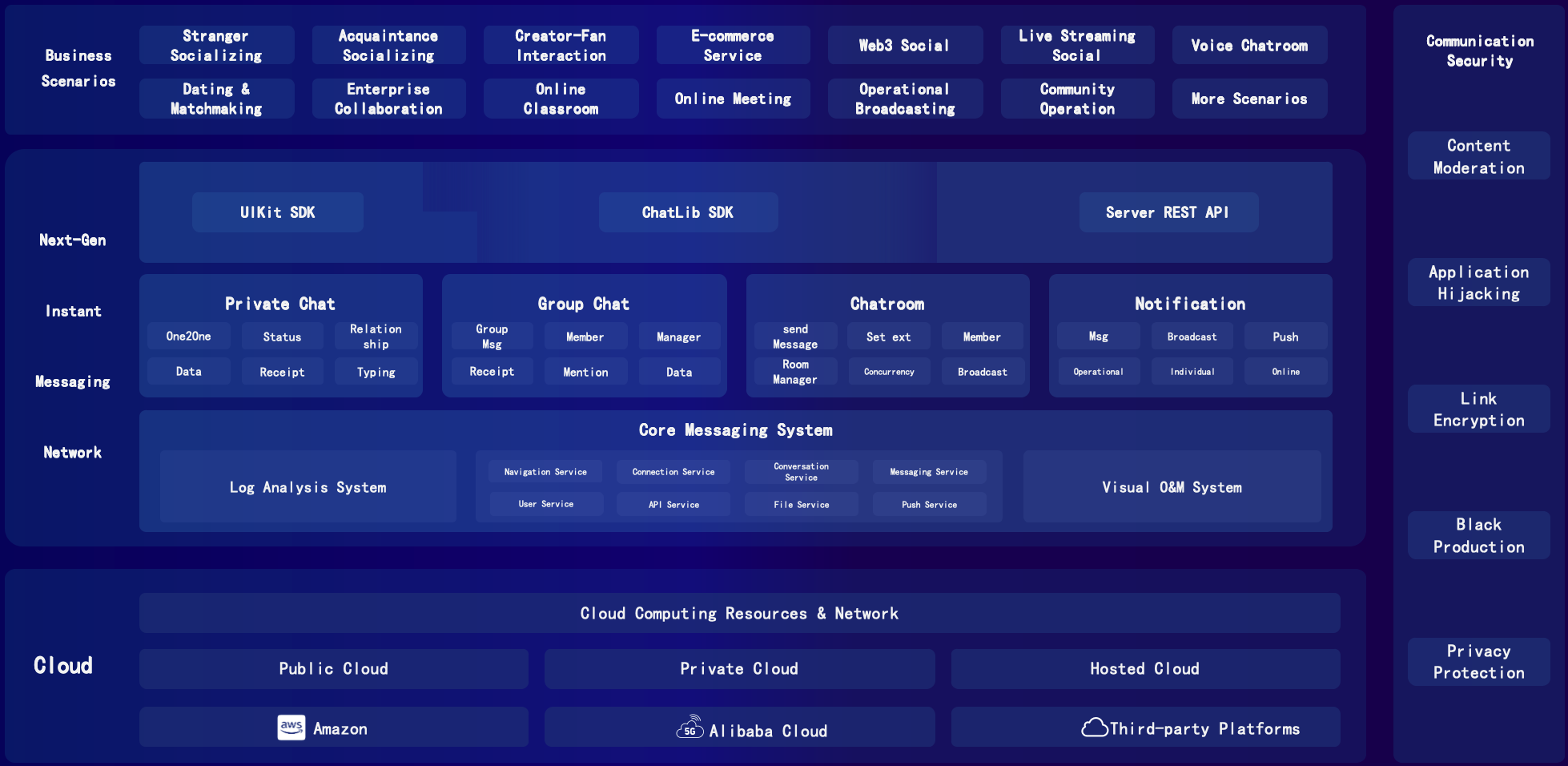
JuggleIM provides SDKs and APIs for adding private messaging, group chat, chatrooms, and system notifications to your applications. Choose Managed Private Cloud for a deployment managed by JuggleIM, or Private Cloud to deploy the service on your own infrastructure. Both models provide the same core messaging capabilities.
An integration connects three components: the IM server, your application backend, and your client application. The client is a mobile app, desktop app, or website that uses the IM SDK. The diagram below shows how these components interact:
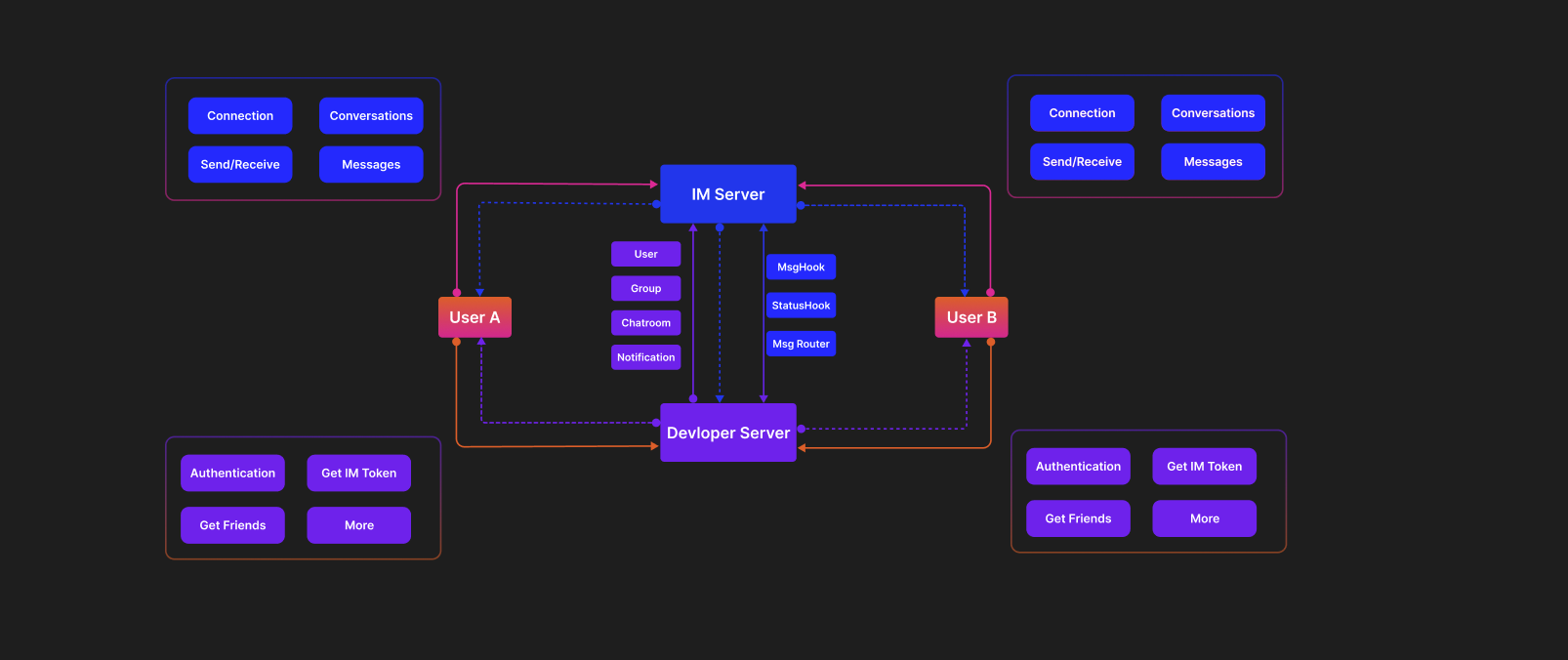
Client SDKs are available for Android, iOS, Web, and Electron. Your application backend uses REST APIs and receives webhook events to integrate messaging with your existing systems. The SDK includes related user and group information in conversation and message lists, so your application can display it without fetching it separately.
Private Chat
Private chat lets two users exchange messages. It supports use cases such as direct messages between acquaintances, following and mutual-following interactions, host-fan interaction, direct messages between strangers, and buyer-seller communication. Private chat supports text, image, voice, and file messages by default. To extend message types, use custom messages. To integrate this feature:
- Create a project in the Admin Console to obtain an AppKey and Secret.
- Have the application backend call the user-registration API to generate IM Tokens for users A and B.
- Start two applications or web browsers and connect them to the IM server by following the quick-start guide.
- After A and B connect successfully, have A call
sendMessagewith conversation typePRIVATEand the conversation ID set to B's user ID.
- B's message listener is triggered and receives the message sent by A.
Group Chat
Group chat lets multiple users exchange messages in a shared conversation. It supports use cases such as groups of friends, fan groups, car-owner groups, parent groups, company groups, department groups, and after-sales groups. Group chat supports the same default text, image, voice, and file messages as private chat. To extend message types, use custom messages. To integrate this feature:
- Create a project in the Admin Console to obtain an AppKey and Secret.
- Have the application backend call the user-registration API to generate IM Tokens for users A, B, and C.
- Have the application backend generate group ID
GroupId01with A, B, and C as members.
- Have the application backend call the IM group-management REST API to create the group and synchronize the group relationship to the IM server.
- After A connects successfully, have A call
sendMessagewith conversation typeGROUPand conversation IDGroupId01.
- After B and C connect successfully, their message listeners are triggered and receive the group message sent by A.
Chatroom
Chatrooms support messaging and interactive events in live streams. Typical uses include live comments, gift notifications, and control signals. Common use cases include e-commerce streams, talent streams, live classes, entertainment streams, sports streams, news streams, and voice chat rooms. Features include likes, sending gifts, live comments, chatroom participant counts, and shopping carts. To integrate this feature:
- Create a project in the Admin Console to obtain an AppKey and Secret.
- Have the application backend call the user-registration API to generate IM Tokens for users A, B, and C.
- Have the application backend generate chatroom ID
ChatroomId01. Chatroom members do not need to be synchronized; users can join from the client.
- Have the application backend call the IM chatroom-management REST API to create the chatroom and synchronize it to the IM server.
- After A connects successfully, have A call
joinChatroomto join roomChatroomId01.
- Have A call
sendMessagewith conversation typeCHATROOMand conversation IDChatroomId01.
- After B and C connect successfully, have them call
joinChatroomto join roomChatroomId01.
- After B and C join successfully, their message listeners are triggered and receive the message sent by A in
ChatroomId01.
System Notifications
System notifications are messages pushed one way from the server to users in an IM product. Both system notifications and private chat involve two parties, but private chat allows both parties to send messages, while system notifications can only be sent through the server API and received by end users. Text, images, voice, files, and custom messages are supported. Typical use cases include application-wide broadcasts, tag-based notifications, and official accounts. To integrate this feature:
- Create a project in the Admin Console to obtain an AppKey and Secret.
- Have the application backend call the user-registration API to generate IM Tokens for users A, B, and C.
- Have the application backend use the system user
system_userto call the system-notification API and send a broadcast message.
- After B and C connect successfully, their message listeners are triggered and receive the system notification sent by
system_user.
Product Matrix